If you’ve ever deleted multimedia files and probably removed a few apps and still noticed that your phone storage is somehow filling up again, you’re definitely not the only one experiencing this.
This is one of the most frustrating things Android users deal with, especially when you feel like you’ve already done everything right.
It can make you feel like your phone is doing something strange behind your back.
But the truth is, most times, your storage is not filling up because you’re careless. It’s filling up because of hidden things your phone keeps saving quietly, even when you think you’ve already deleted enough. So let’s talk about what’s really going on.
Deleted Files Don’t Always Leave Immediately
One thing many people don’t realize is that when you delete something on your phone, it doesn’t always disappear instantly. Most Android phones now have a trash or recently deleted folder, just like laptops.
Don't MIss This Article

So even after deleting photos or videos, they may still be sitting inside the recycle bin for 30 days. That means the storage space is not fully freed until you empty that folder completely.
So if you delete 2GB of videos and your storage barely changes, the first thing to check is your gallery’s trash folder.
WhatsApp is Usually the Biggest Culprit
For many Nigerians, WhatsApp is the number one reason your storage keeps filling up. Even if you don’t download things manually, WhatsApp often saves media automatically unless you turn it off.
Don't MIss This Article

WhatsApp stores videos people send to groups, voice notes, photos, stickers, documents, and even status updates. The worst part is that group chats can silently pile up media without you noticing.
You may delete some videos today, but WhatsApp keeps receiving and saving new ones every single day, especially if you’re active in many groups. That’s why your storage feels like it never stays free.
A good habit is to go into WhatsApp storage settings and see exactly what is taking up space.
Apps Keep Building Cache Over Time
Another major reason storage keeps filling up is app cache. Apps like Instagram, TikTok, Facebook, Chrome, and YouTube store temporary files so they can load faster.
At first, it’s small, so you don’t notice it. But over weeks and months, that cache can grow into several gigabytes.
Even if you delete personal files, these apps keep creating new cached data daily. So your storage fills up again, not because of your photos, but because of hidden app files.
Don't MIss This Article

Clearing cache regularly can make a big difference.
Your Downloads Folder Keeps Collecting Junk
Many people forget about the Downloads folder completely. Every time you download something from Chrome, Telegram, or even email attachments, it often stays inside Downloads forever.
Old PDFs, forwarded WhatsApp files, random images, APK files, and music may not show up in your gallery, but they are still sitting in your storage quietly.
Sometimes your phone storage is full simply because your Downloads folder has been collecting junk for years.
Deleted Apps Can Still Leave Data Behind
Another surprising thing is that uninstalling apps doesn’t always remove everything. Some apps leave behind leftover folders, saved files, or offline content.
For example, if you uninstall TikTok or Spotify, the downloaded videos or music files may still remain inside your internal storage.
So even though the app is gone, some of its data may still be sitting there, taking up space.
That’s why file manager apps sometimes show folders you don’t recognize.
System Files Grow Over Time Too
Android itself also uses storage in the background. Over time, your phone accumulates system logs, update files, and temporary data.
After major Android updates, your phone may keep some old files for rollback purposes. These files can take up several gigabytes without you knowing.
This is normal, but on phones with smaller storage, it becomes a big problem.
Google Photos and Cloud Sync Can Confuse You
Sometimes, cloud sync makes storage feel confusing. You can delete photos from your gallery, but they remain in Google Photos. Or you delete from Google Photos, and it removes them from your phone too.
Some files may also re-download automatically when syncing is active.
So it can feel like files are coming back, when it’s actually cloud services doing background syncing.
What You Should Do If Your Storage Keeps Filling Up
If your phone storage keeps filling up even after deleting files, here are practical things that help.
First, always empty your trash or recently deleted folder. That alone can free up a lot of space.
Next, check WhatsApp storage and turn off automatic media download for group chats. WhatsApp is usually the biggest storage eater for most Nigerians.
You should also clear cache for heavy apps like Instagram, TikTok, and Chrome regularly. It won’t delete your data, but it will remove unnecessary temporary files.
Go through your Downloads folder and delete old junk that has been sitting there for months.
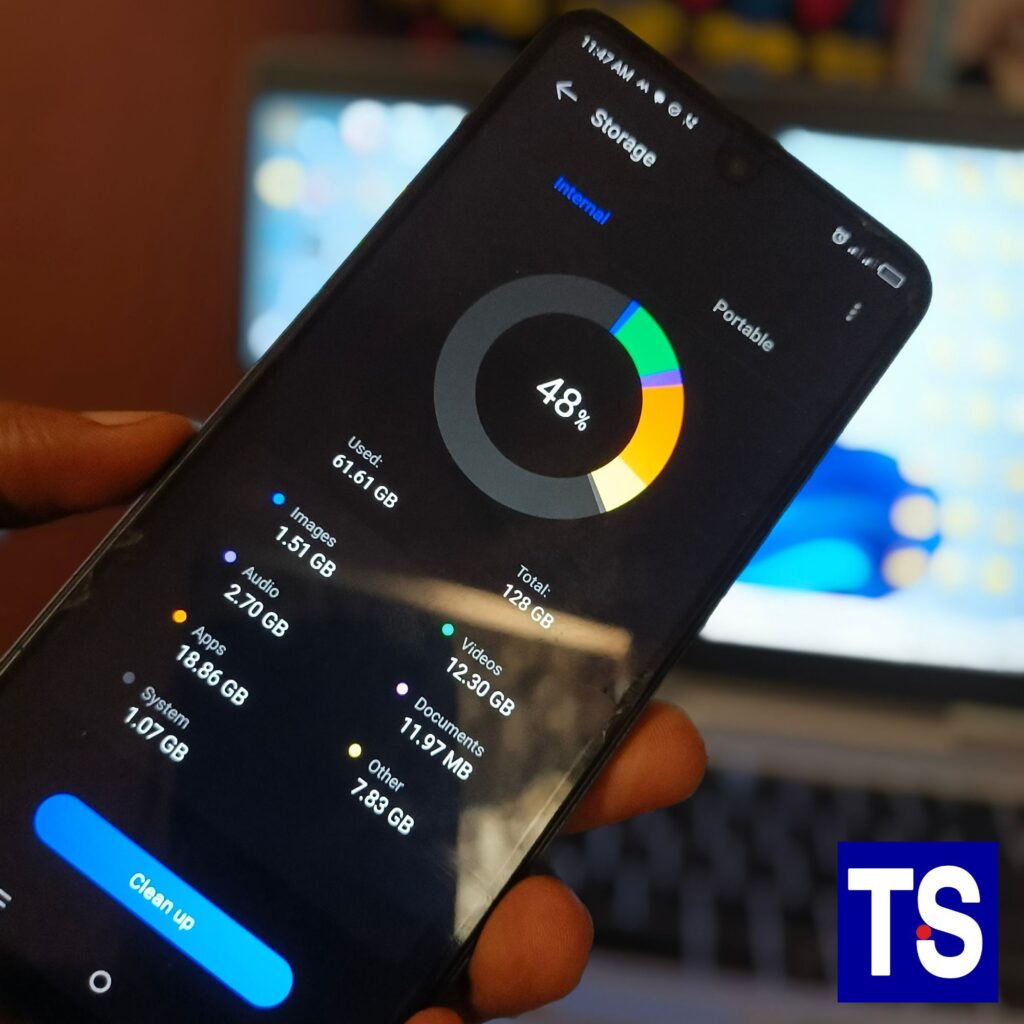
Finally, use your phone’s built-in storage manager to see what is really taking space. Most Android phones now show a clear breakdown of what is filling your storage.
My Thoughts
If your phone storage keeps filling up even after you delete files, it doesn’t mean your phone is broken. Most times, it’s because of hidden storage users like WhatsApp media, app cache, downloads, leftover app data, and system files growing quietly in the background.
Once you understand where the space is really going, it becomes much easier to control it. With a few regular checks, your phone storage can stay free and your device will also run smoother.
FAQ
Why is my phone storage full even after deleting files?
Because deleted files may still be in the trash, apps build cache, and WhatsApp keeps saving new media.
What app takes the most storage in Nigeria?
For most people, WhatsApp is the biggest storage consumer.
Does clearing cache delete my photos or chats?
No. Clearing cache removes temporary files, not your personal data.
How often should I clear storage?
At least once every few weeks, especially if you download a lot of videos or use WhatsApp heavily.